AI Fisheye Lens Effect
Upload a photo to get a dramatic close-up look with curved edges. The AI Fisheye Lens Effect adds a rounded wide-angle distortion like a real fisheye lens.
Preview Images of Fisheye Lens Filter
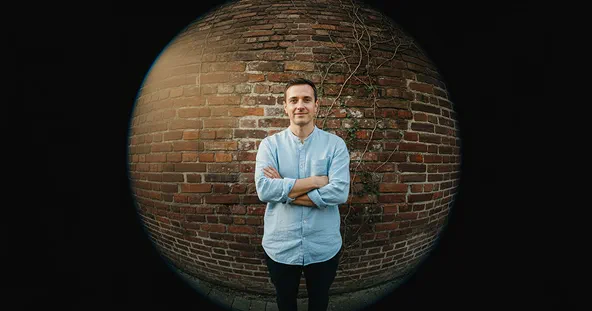
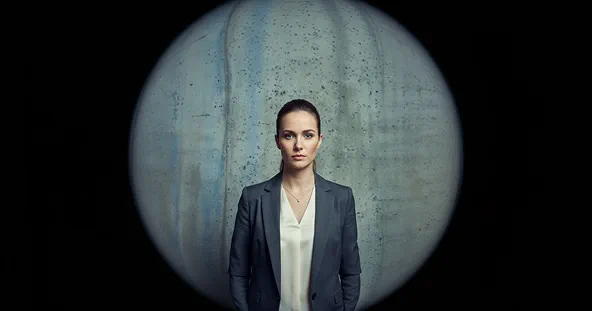
How Fisheye Filter Works?
Upload Photo
Select & Upload photos from your device to apply Fisheye Filter, and make sure uploaded photos must be in high quality with a well-lit background.
Apply Fisheye Filter
After the photo is uploaded click on the “Apply Image Effect” button to apply Fisheye Filter to your photo.
Download & Share
Download your generated Fisheye Filter to your device and share it on your favorite social media platform, and with your friends and family.
Why Our Fisheye Filter Stands Out
Instant, AI-Powered Results
Upload your photo and get a fisheye-style visual within seconds. No editing or design skills are needed—the AI handles everything for you.
High-Quality Outputs
Enjoy professional-grade results with exceptional clarity, detail, and color accuracy in every image generated with our fisheye filter.
Completely Free to Use
Access all features at no cost. There are no hidden fees or subscriptions—just unlimited creativity with zero restrictions.
Secure and Private
Your privacy is our priority. Every image is processed safely, ensuring your data remains confidential and is never shared with third parties.
What People Say about us
Olivia
Content Creator
"This fisheye filter is exactly what I was looking for. It gives my photos such a cool and unique vibe!"

Ethan
Digital Artist
"I love how this works with all the other tools in Max Studio. It's super simple to create awesome visuals for my projects."
Mia
iOS user from USA
"Finally, a fisheye effect that looks authentic and not cheesy. My videos stand out so much more now."